Verified GitHub source guide

Citron Neo Emulator Download

Get Citron Neo Emulator for Windows, Android, Linux, macOS, and Steam Deck from verified GitHub release pages. Citron Neo Wiki helps you choose the right build, understand stable versus nightly versions, install the emulator safely, and avoid fake download mirrors, ROM bundles, firmware downloads, and key packs.

Every download button opens a verified GitHub source after a 15-second safety countdown.

GitHub release links only No ROMs, keys, or firmware files Checked on July 7, 2026
Citron Neo Wiki logo

Latest version freshness check

Stable 2026-04-27 + CI nightly 2026-07-06

Stable release
2026-04-27
Latest CI build
9d930f9e2
CI date
2026-07-06
Platforms
Windows, Android, Linux, macOS
Source
GitHub releases
Site role
Independent download guide

The stable Citron Neo Emulator release was verified from the citron-neo/emulator GitHub release page. The current CI channel was verified from citron-neo/CI releases, where Windows, Linux, Android, and macOS nightly builds were published on July 6, 2026.

Choose your build

Citron Neo Emulator downloads by platform

Windows PC

Use the Windows x64 build if you want the simplest Citron Neo Emulator download for a desktop or gaming laptop. The stable release includes MSVC and clang-based Windows archives.

  • Stable file example: Citron-windows-nightly-0237a9b88-x64-msvc.zip
  • Approximate stable file size: 40.5 MB
  • Nightly Windows channel: nightly-windows
Open Windows source

Android APK

Android users can use the official GitHub APK assets instead of random APK mirrors. This Citron Neo Emulator Android download path is best for phones, tablets, and handheld Android devices.

  • Stable file example: app-mainline-release.apk
  • Approximate stable file size: 22.2 MB
  • Nightly Android channel: nightly-android
Open Android source

Linux and Steam Deck

Linux users can pick AppImage builds for x86_64 or aarch64. Steam Deck users should start with the Linux x86_64 AppImage and keep graphics drivers and firmware legally sourced.

  • Stable file example: citron_nightly-0237a9b88-linux-x86_64.AppImage
  • Approximate stable file size: 97.4 MB
  • Nightly Linux channel: nightly-linux
Open Linux source

macOS

The macOS DMG build is listed on GitHub releases when available. Check whether your Mac hardware, graphics stack, and OS version match the build before expecting smooth emulation.

  • Stable file example: Citron-macOS-nightly-0237a9b88.dmg
  • Approximate stable file size: 73.8 MB
  • Nightly macOS channel: nightly-macos
Open macOS source

What this site does

A safer Citron Neo Emulator download guide

Citron Neo Emulator search intent is very direct: most visitors want the correct Citron Neo Emulator download, a version that matches their device, and a quick explanation of what to do after the archive, APK, AppImage, or DMG is downloaded. This Citron Neo Emulator download guide is built around that first job. The page puts platform choices, release freshness, source links, and safety notes before long background copy so users can make a confident download decision quickly.

This site does not claim to be the official Citron Neo project. It is an independent guide that points users toward the public GitHub release sources maintained by the Citron Neo project. That distinction matters because emulator searches often attract fake mirrors, repacked APK files, misleading installer buttons, and pages that bundle copyrighted games or private console files. A trustworthy Citron Neo Emulator download page should make the source visible and explain what is not included.

The Citron Neo Emulator itself is useful only after a user has a compatible device, a legal game dump, and any required local files they are allowed to use. Citron Neo Wiki explains setup concepts, but it does not distribute Nintendo Switch games, ROMs, NSP/XCI files, firmware packages, prod.keys, title.keys, or bypass tools.

Citron Neo Emulator information

App name Citron Neo Emulator
Category Nintendo Switch emulator
Price Free / open source release assets
Primary source github.com/citron-neo
Stable checked 2026-04-27
Nightly checked 2026-07-06
Supported builds Windows, Android, Linux, macOS
Legal status Guide only; no games, keys, or firmware

Install basics

How to install Citron Neo Emulator safely

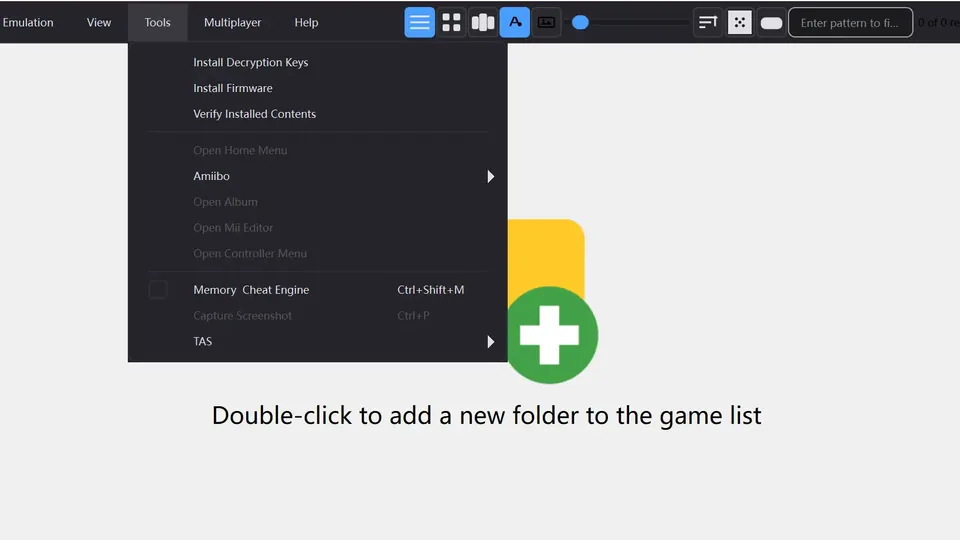
Real Citron Neo Emulator Tools menu screenshot showing install decryption keys and install firmware options
Official Citron NEO setup screenshot showing the Tools menu used for local keys and firmware setup.
Step 1

Choose stable or nightly

Start with the stable GitHub release when you want a calmer Citron Neo Emulator download experience. Choose nightly builds only when you need a newer fix, a newer Android package, or a platform build that is not available in the stable release. Nightly builds can change quickly, so keep a note of the build hash.

Step 2

Download from GitHub

Use the GitHub source linked above and match the file to your system: ZIP for Windows, APK for Android, AppImage for Linux or Steam Deck, and DMG for macOS. Avoid pages that hide the real file name, force browser extensions, or claim to include games, firmware, keys, or premium unlocks.

Step 3

Install or extract the build

Windows archives should be extracted before launching the emulator. Android APK files require sideloading permissions. Linux AppImages may need executable permission. macOS DMG files should be opened from the downloaded disk image. If the app does not start, check antivirus quarantine, permissions, GPU driver support, and whether you downloaded the correct architecture.

Step 4

Set up local files legally

Citron Neo Emulator setup may require local files that must come from your own legally owned console and games. This site explains the role of firmware, prod.keys, title.keys, and game dumps, but it does not host or link downloads for those files. Do not trust sites that bundle private files inside an emulator installer.

Download safety checklist

  • Prefer GitHub release pages over APK mirrors or repack sites.
  • Check the release tag, file name, platform, and build hash before installing.
  • Treat browser popups, extension installers, and password-protected archives as red flags.
  • Do not download ROMs, NSP/XCI files, prod.keys, title.keys, or firmware from emulator download pages.
  • Keep GPU drivers, Android system components, or Linux runtimes updated from their official sources.

Important boundary

Citron Neo Wiki does not provide games, keys, or firmware

Searches such as citron firmware, citron keys, citron prod keys, and citron firmware download appear in keyword data, but those searches sit on the risky side of emulator SEO. Citron Neo Wiki can explain what those file types are and why users see related setup prompts, but it will not provide download links, file packs, mirrors, or instructions for bypassing copyright protections.

The clean strategy is to separate emulator release discovery from copyrighted content. A Citron Neo Emulator download page can be useful and rankable when it helps users find official source builds, understand compatibility, and troubleshoot installation. It becomes unsafe when it offers game files or private console data. This site follows the safer model.

Performance and compatibility

Citron Emulator compatibility depends on more than the download

Hardware matters

CPU performance, graphics API support, GPU drivers, RAM, storage speed, and thermal limits all affect Citron Neo Emulator performance. A fast Windows PC and a mid-range Android phone can behave very differently even when both use the newest build.

Game status varies

A compatibility list should distinguish games that are playable, booting, broken, or untested. Future Citron Neo Wiki compatibility pages should use status labels, emulator version, platform, graphics backend, and last updated date instead of vague claims.

Settings are not universal

OpenGL, Vulkan, resolution scale, shader cache, audio settings, and controller mapping can fix one title while breaking another. Keep troubleshooting notes tied to a version and platform so users understand what changed.

Next SEO pages

Recommended Citron Neo Emulator download-site expansion

This homepage is intentionally the first crawlable Citron Neo Emulator download guide. The next pages should be platform pages and support pages that answer specific search intent without becoming thin doorway pages. Each page should keep official-source download links, a 15-second countdown, version facts, setup steps, and legal boundaries.

Future page cluster

Questions users ask before downloading

Citron Neo Emulator FAQ

Where should I download Citron Neo Emulator?

Download Citron Neo Emulator from the citron-neo GitHub release pages. Citron Neo Wiki links to verified GitHub sources and uses a 15-second countdown so you can see that the destination is GitHub before leaving the page.

What is the latest Citron Neo Emulator version?

The stable GitHub release checked for this page is 2026-04-27. The CI nightly channel checked on July 7, 2026 shows Windows, Linux, Android, and macOS builds published on July 6, 2026 with build hash 9d930f9e2.

Is Citron Neo Emulator available for Android?

Yes. Citron Neo Emulator Android APK assets are listed on the official GitHub release and CI pages. Android users should avoid unofficial APK mirrors because emulator APK files are commonly repacked by third-party download sites.

Does this site provide firmware or prod.keys?

No. Citron Neo Wiki does not host or link firmware, prod.keys, title.keys, ROMs, NSP files, XCI files, or game dumps. Those files must not be bundled into an emulator download guide.

Should I use stable or nightly builds?

Use the stable release if you want the most predictable Citron Neo Emulator download. Use nightly builds when you need a newer platform package or a recent bug fix, and remember that nightly behavior can change from one build hash to the next.

Can Citron Neo Emulator run on Steam Deck?

Steam Deck users should start with Linux AppImage builds and check controller mapping, graphics backend, and driver behavior. Performance depends on the game, emulator version, graphics settings, and system updates.

Why do many sites offer Citron APK downloads?

APK search terms attract third-party mirrors because Android users often search for direct files. The safer approach is to open the official GitHub Android release source and avoid any APK page that adds unrelated installers, file passwords, or bundled copyrighted content.

Is Citron Neo Wiki an official Citron Neo site?

No. Citron Neo Wiki is an independent Citron Neo Emulator download guide for setup, compatibility, and safety research. It is not affiliated with Nintendo or the Citron Neo project.