Windows build choice
Citron Clangtron vs MSVC: Which Build Should You Use?
Citron publishes two Windows ZIPs from the same release: a Clangtron build and an MSVC-compatible clang-cl build. Start with MSVC for a predictable baseline; test Clangtron when you want a second compiler path or are isolating a build-specific problem.
Quick verdict
Use MSVC first, then compare Clangtron only when it answers a real question
For most Windows users, the MSVC or clang-cl package is the safer first test because it follows the native Windows ABI path described by the project and gives you a clean baseline. The Clangtron package is not automatically faster, safer, or more compatible simply because it is larger.
Choose both packages only for controlled comparison. Keep the same Citron commit, settings, game files, firmware, keys, driver, and test scene. If one build fails and the other works, record the exact filename and error instead of turning one result into a universal recommendation.
If you are asking what Clangtron is, treat it as an alternative Windows build path, not a guarantee of higher FPS. Start with MSVC or clang-cl as the baseline, then test Clangtron in a separate folder with the same commit, driver, settings, and scene.
Use a controlled comparison when choosing between Clangtron and MSVC. Install each build in its own directory, use a clean profile for each test, and run the same title at the same scene. Keep the renderer, resolution scale, shader-cache state, controller mapping, firmware, keys, and save backup unchanged. If the result changes after several variables change together, it does not show that the compiler build is better.
Keep the two installations isolated even when both archives come from the same Citron project. Separate folders make it easier to identify which executable produced a log, which configuration file was loaded, and which shader cache belongs to the test. Back up saves before switching builds, and do not let a troubleshooting session overwrite the only copy of a working profile.
If Clangtron starts while MSVC fails, or the reverse, compare the executable name, commit or tag, Windows architecture, runtime dependency, GPU driver, and first error in the log before changing graphics settings. Reproduce the failure with defaults, then record whether it happens before the menu, during shader compilation, when loading a title, or after entering gameplay. That sequence is more useful than a single crash screenshot.
Do not treat a higher or lower frame-rate reading from one machine as proof that Clangtron is universally faster. Frame pacing, shader compilation, thermal limits, background processes, driver versions, and the selected scene can dominate a short benchmark. A useful comparison records the same test duration, resolution, renderer, frame-time behavior, and repeatable failure point for both builds.
A practical decision rule is simple: start with the MSVC or clang-cl package as the reference, try Clangtron when you have a specific comparison or build-specific issue, and keep the working reference available. If neither build solves the problem, move to the official release notes, issue tracker, or a clean compatibility test instead of repeatedly changing compiler packages without a controlled observation.
Side-by-side
Citron Clangtron vs MSVC comparison
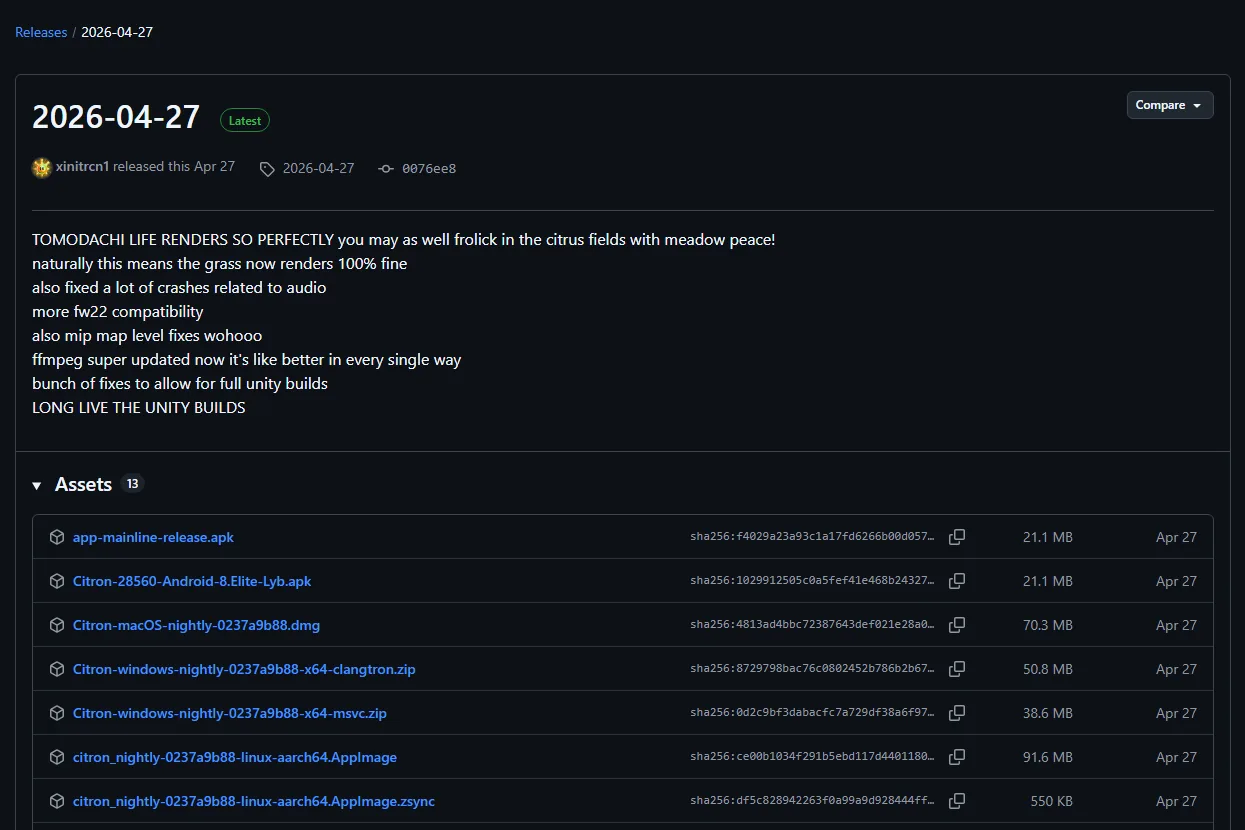
The two ZIPs come from the same Windows release channel, but the official build pipeline uses different toolchain paths. File size is evidence of packaging, not proof of speed.
| Factor | Clangtron build | MSVC / clang-cl build |
|---|---|---|
| Official stable filename | Citron-windows-nightly-0237a9b88-x64-clangtron.zip | Citron-windows-nightly-0237a9b88-x64-msvc.zip |
| Stable asset size | 53,286,760 bytes (about 50.8 MiB) | 40,497,628 bytes (about 38.6 MiB) |
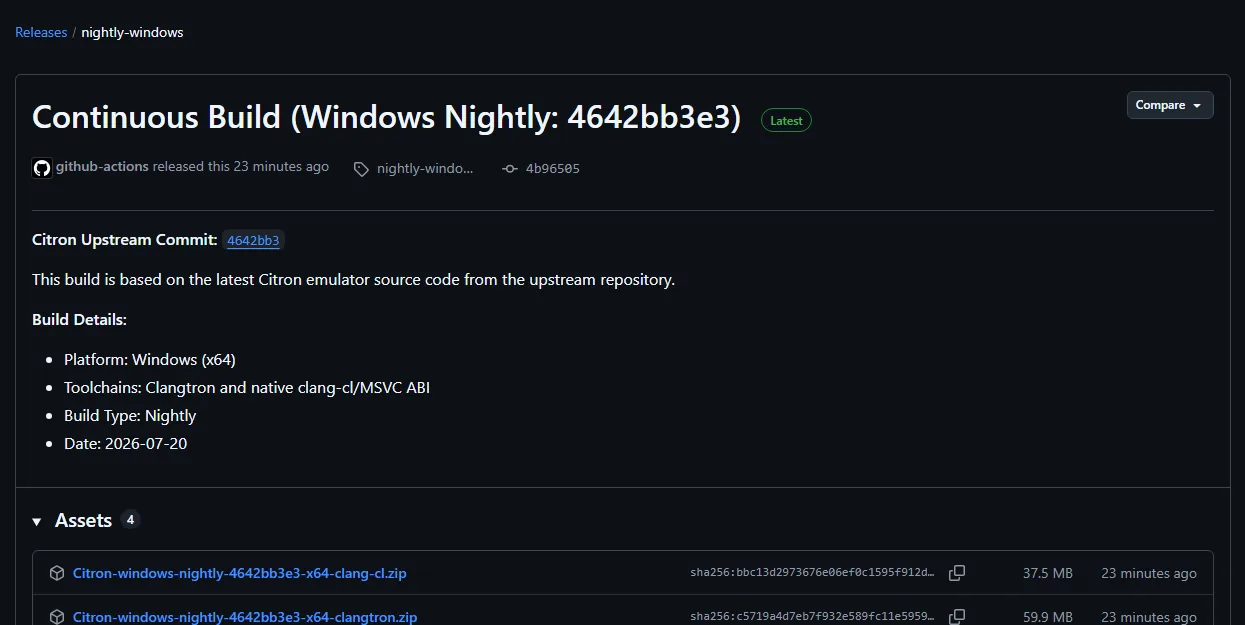
| Nightly filename checked | Citron-windows-nightly-22d5038ec-x64-clangtron.zip | Citron-windows-nightly-22d5038ec-x64-clang-cl.zip |
| Nightly asset size | 62,693,673 bytes (about 59.9 MiB) | 39,075,318 bytes (about 37.5 MiB) |
| Toolchain signal | Project Clangtron/LLVM-Mingw optimized path with PGO and LTO options | Native Windows clang-cl path using the MSVC ABI and Windows SDK |
| Best first use | Second opinion, build-specific debugging, controlled benchmark | Default baseline, first installation, reproducible troubleshooting |
Verified from first-party GitHub release data on August 7, 2026. A later nightly may replace filenames and sizes at the same tag URL.
Decision guide
When each Citron Windows build makes sense
Pick the package that reduces uncertainty for your current task, not the one with the most impressive name or largest archive.
Choose MSVC / clang-cl first
Use it as the reference build for installation and troubleshooting.
- You are installing Citron on Windows for the first time.
- You want the smaller archive and a native Windows toolchain baseline.
- You need a clear result before testing alternative compilers.
Try Clangtron as a comparison
Use it when a second build can confirm whether the problem is compiler-specific.
- MSVC crashes or fails in a repeatable scene.
- You are comparing performance with identical settings and drivers.
- You can keep separate folders, logs, and save backups.
Official-source check
Verify the exact ZIP before downloading
Nightly tags are moving release pages. The URL stays stable while the commit hash, file names, sizes, and publication date can change.
Open the official release
Use the citron-neo GitHub release or CI nightly-windows tag, not a mirror.
Match the build name
Look for x64-clangtron or x64-clang-cl/MSVC in the asset filename.
Record the evidence
Save the commit hash, file size, date, and the build that produced your result.
Troubleshooting build-specific differences
Do not change the compiler build and several emulator settings at the same time. One controlled change makes the result useful.
| Symptom | Check first | Next step |
|---|---|---|
| One ZIP launches, the other does not | Confirm both packages use the same commit and were extracted to separate folders. | Capture the error and test once with clean configuration files. |
| Performance differs | Use the same driver, graphics backend, resolution, shader state, and test scene. | Repeat the run and compare frame-time behavior, not one FPS snapshot. |
| Antivirus flags one archive | Confirm the URL is the official GitHub asset and inspect the exact filename. | Do not claim the file is safe from a single scan; stop if the source is a mirror. |
| A nightly regresses | Keep the previous known-good folder and save backup. | Return to stable or the previous nightly and report the commit-specific issue. |
FAQ
Citron Clangtron vs MSVC FAQ
Is Citron Clangtron faster than MSVC?
Not by definition. The project offers different build paths, but real performance depends on the commit, game, CPU, GPU driver, backend, settings, and test scene. Benchmark both under identical conditions.
Is Clangtron the same as clang-cl?
No. The project build script describes Clangtron as an LLVM-Mingw-oriented optimized path, while clang-cl is the native Windows path using the MSVC ABI and Windows SDK.
Can I install both builds?
Yes. Extract them to separate folders and avoid sharing experimental configuration when you are diagnosing a difference. Back up saves before testing.
Which file should beginners download?
Start with the MSVC or clang-cl ZIP. It is the clearest baseline. Move to Clangtron only when you have a reason to compare.
Are the stable and nightly filenames permanent?
No. Stable release assets are tied to a dated tag, while nightly tag assets can be replaced. Recheck the official page before every download.
What is Clangtron?
Clangtron is an alternative Citron Windows build path. It may be useful for controlled comparison or build-specific troubleshooting, but its name alone does not prove better performance or compatibility.
Should I download Clangtron or MSVC for Citron?
Start with the MSVC or clang-cl build as the reference installation. Try Clangtron only when you have a reason to compare, and keep both builds, logs, settings, and save backups separate.
Sources
First-party evidence
The guide separates verified release facts from recommendations.
- Official stable releaseStable 2026-04-27 asset names and byte sizes.
- Official Windows nightlyCurrent Windows CI hash, asset names, toolchain note, and date.
- Official Clangtron build scriptProject comments describing PGO/LTO, LLVM-Mingw, clang-cl, and MSVC ABI paths.